NDT SetupBuilder
NDT SetupBuilder is a new PC-based software allowing to create inspection setup and visualize beam simulations. This software presents multiple features for easy, fast, and comprehensive inspection strategy elaboration that can directly be imported in the OmniScan MX2 and SX.
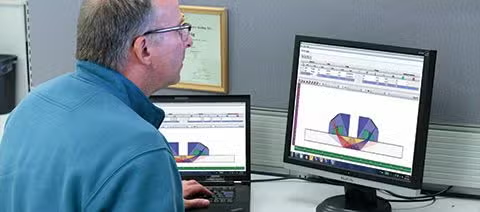
NDT SetupBuilder Software for Ultrasonic Testing
NDT SetupBuilder design software is a key component in our suite of automated and semi-automated ultrasonic testing (UT) solutions. It enables nondestructive testing (NDT) professionals to significantly reduce the time required to configure inspections using OmniScan™ MX2, SX, X3, and X4 flaw detectors. By ensuring configurations comply with relevant inspection codes, the software helps minimize potential setup errors.
Key Benefits
- Focal law calculator
- Intuitive, cost-effective operation
- 3D part, wedge, and probe visualization
- Efficient keyboard shortcuts
- Seamless import/export to OmniScan SX flaw detectors (using law config 5.2)
User Interface Overview
The NDT SetupBuilder software interface is centered around two main grids: Probe Sets and Groups. These grids provide a clear overview of probe, wedge, position, and beam parameters.
Additional interfaces support wedge and probe definition, as well as parameter validation.
Wedge and Probe Management
The Wedge menu gives access to wedges from the Evident database, including detailed dimensions such as length, width, and height. Users can visualize the wedge using top, side, and end views.
Likewise, the Probe interface displays available probes along with their respective parameters from the Evident database.
Efficient Remote and On-Site Setup
With NDT SetupBuilder, supervisors can define inspection techniques and configure ultrasonic beam parameters directly on a PC—either remotely or on-site—without needing to access an OmniScan unit. Once finalized, configurations can be exported to the OmniScan™MX2, SX, X3, and X4, reducing setup time and minimizing handling errors.
Compound Scan Capability
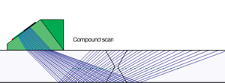
A single-group compound scan can provide similar coverage to two sectorial scans. NDT SetupBuilder software supports compound scan beams, a hybrid strategy combining sectorial and linear beams.
Advantages of Compound Scanning
- Improved probability of detection
- Better coverage for thicker materials
- Increased inspection speed
- Reduced setup and calibration time
- Accelerated data analysis
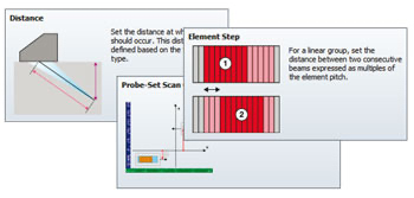
Built-in Tooltips for Easy Navigation
Users can hover over interface elements—such as tabs, toolbars, and dialog boxes—to view tooltips. These tooltips include clear visuals and concise descriptions, making the software accessible even to less experienced users.
2D and 3D Visualization with RayTracing
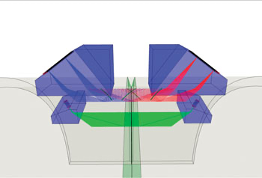
The RayTracing view renders graphical illustrations of parts, probes, wedges, and groups in 2D or 3D. Users can select top, side, and end views and interactively configure parameters while viewing probe element information.
Beyond Ray Tracing: Streamlined Configuration Management
All configurations created in NDT SetupBuilder and supported by the OmniScan MX2 and SX can be exported as .ondt setup files. Unsupported group configurations can be exported as .law files, allowing the software to double as a focal law calculator.
Export configurations via USB or SD card for direct import into your OmniScan unit. Once imported, simply calibrate—the unit is ready for inspection with no additional setup menus required.
Feature Summary
- Export setup configurations to OmniScan MX2 and SX (.ondt)
- Export focal laws as .law files for the OmniScan MX2, SX, X3, and X4
- Configurable acquisition unit
- Supports plate, pipe, and bar geometries
- Compatible with PA linear, TOFD, UT, and dual matrix
- Supports sectorial, linear, single beam, and compound scan types
- Custom weld template creation
- User-defined probes and wedges
- Scan plan reporting
- RayTracing with top, side, end, and 3D views
- Beam formation and near-field information
- Element deactivation support
- Focalization options: true depth and half-path
- Dual unit support: metric and US customary units